


Sale -35%
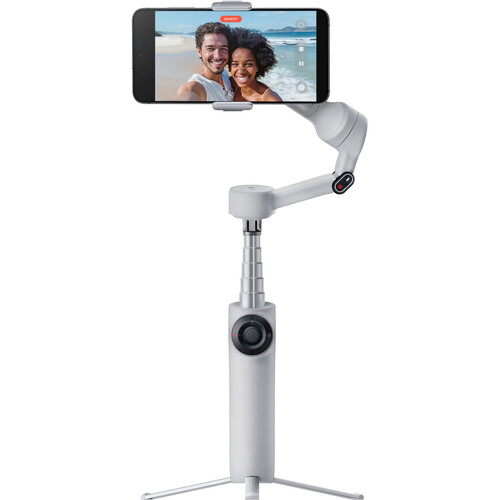
Insta360 Flow 2 Standard Bundle (Stone Gray)
Rs. 9,799.00 Rs. 14,990.00
Tax included.
Shipping calculated at checkout.
people are viewing this right now
sold in last
hours
In Stock
Product Code:
INSTA 360 FLOW 2 STONE GRAYProduct type:
Camera Accessories
Only 3 item(s) left in stock
Share
All products sold on gpxcamerastore.com comes with 100% Manufacturer Warranty

Product Introduction
The Insta360 Flow 2 Smartphone Gimbal Stabilizer is a compact AI-powered gimbal for vloggers, travelers, families, and mobile content creators. It combines smooth 3-axis stabilization with intelligent tracking and easy controls. Therefore, you can create polished smartphone videos without carrying a large camera setup.
The Flow 2 folds into a pocket-friendly design and opens quickly for fast shooting. Moreover, its built-in selfie stick and metal mini tripod give you more ways to frame your shots.
Advanced AI tracking helps keep your subject in view. In addition, gesture control and remote smartphone control make solo recording much easier.
The gimbal also provides up to 10 hours of battery life. As a result, you can shoot for long periods before recharging.
Design & Build Quality
Insta360 Flow 2 Smartphone Gimbal Stabilizer Design
The Insta360 Flow 2 Smartphone Gimbal Stabilizer uses a compact folding design that is easy to carry.
You can unfold the gimbal in one simple movement and start shooting quickly. Therefore, there is no need for a long setup process.
When you finish shooting, the gimbal folds down into a small size. Consequently, it fits easily inside many bags and travel kits.
1-Step Rapid Deploy
The Flow 2 is designed to help creators capture unexpected moments quickly.
Simply unfold the gimbal to get started. You do not need to untwist multiple arms or go through a complex setup.
Therefore, it works well for travel videos, family moments, street content, and everyday vlogging.
Built-In Metal Mini Tripod
The base features an integrated metal mini tripod.
This allows you to place the gimbal on a flat surface for stable hands-free recording.
As a result, you can record yourself, create time-lapses, capture group shots, or use AI tracking without holding the gimbal.
Built-In Selfie Stick
The Flow 2 also includes an extendable selfie stick.
Therefore, you can capture wider selfies, higher angles, low-angle shots, and creative perspectives.
Moreover, combining the selfie stick with 3-axis stabilization gives you more flexibility while moving.
Integrated Cold Shoe Mount
An integrated cold shoe mount lets you add compatible accessories.
For example, you can attach a compact fill light or wireless microphone receiver.
Consequently, the Flow 2 can become part of a more complete mobile content creation setup.
Performance
Insta360 Flow 2 Smartphone Gimbal Stabilizer Performance
The Insta360 Flow 2 Smartphone Gimbal Stabilizer uses 3-axis stabilization to reduce unwanted movement.
Therefore, handheld footage looks smoother while walking, running, traveling, or filming action.
The gimbal supports smartphones weighing up to approximately 10.6 oz / 300 g.
As a result, it can accommodate many popular iPhone and Android models.
3-Axis Stabilization
The Flow 2 stabilizes movement across three axes.
This helps reduce shake, tilt, and unwanted rotation while filming.
Therefore, videos can look smoother and more professional than standard handheld smartphone footage.
Moreover, stabilization remains useful while walking, following a subject, or creating dynamic camera moves.
Smooth Action Shooting
The gimbal is useful for active situations such as sports, travel, outdoor activities, and events.
Its stabilization system helps keep footage controlled even when the camera operator is moving.
As a result, creators can focus more on framing and storytelling.
AI Tracking & Smart Features
Advanced AI Tracking
The Insta360 Flow 2 Smartphone Gimbal Stabilizer uses advanced AI tracking to follow subjects automatically.
This makes it easier to keep a person centered while they move.
Therefore, solo creators can record themselves without needing another camera operator.
Furthermore, AI tracking is useful for vlogs, presentations, fitness videos, family moments, and social media content.
Gesture Control
The Flow 2 supports AI-enabled gesture controls.
You can raise your hand to start recording and tracking. Then, you can use the gesture again to stop.
Therefore, you do not need to touch the gimbal every time you want to begin or end a shot.
This feature is especially useful when filming yourself from a distance.
Smartphone Remote Control
You can also control the gimbal remotely with another smartphone.
As a result, you can manage recording without standing next to the gimbal.
This provides additional flexibility for solo shoots, group videos, and stationary recording.
Teleprompter Support
The Flow 2 includes a teleprompter feature for self-recording.
You can follow your script while moving and shooting.
Therefore, it is useful for presentations, tutorials, social media videos, and talking-head content.
Shooting Modes
Auto Mode
Auto mode adjusts gimbal settings according to the shooting situation.
Therefore, beginners can start recording without manually changing multiple settings.
It is a practical choice for everyday use.
Follow Mode
Follow mode responds naturally to your movements.
It provides precise control and works especially well for vertical video.
Therefore, it is useful for reels, shorts, stories, and other social media content.
Pan Follow Mode
Pan Follow mode focuses on smooth horizontal movement.
As a result, it works well for landscapes, walking shots, and cinematic pans.
FPV Mode
FPV mode creates more dynamic movement.
It can simulate the flowing motion associated with FPV-style camera shots while still using gimbal stabilization.
Therefore, it is useful when you want a more energetic visual style.
Dolly Zoom
The Flow 2 supports creative Dolly Zoom effects through the Insta360 app.
This classic cinema-style effect changes perspective while adjusting zoom.
As a result, you can create dramatic shots directly with your smartphone.
Motion Time-Lapse
Motion Time-Lapse lets you combine time-lapse recording with controlled camera movement.
Therefore, you can create dynamic sequences of sunsets, city scenes, clouds, or busy environments.
TimeShift
TimeShift speeds up movement through time and space.
As a result, you can create energetic hyperlapse-style content while moving through your environment.
Panorama Modes
Place the Flow 2 on its built-in tripod to create panorama images.
Supported options include:
- 360° panorama
- 240° panorama
- 180° panorama
- 3 x 3 grid panorama
Therefore, you can capture wider scenes with minimal setup.
Barrel Roll
The Flow 2 can also create Barrel Roll effects using its SmartWheel controls.
This adds a rotating motion to your footage for a more creative look.
Hoop Mode
AI Sports Tracking
The Insta360 Flow 2 Smartphone Gimbal Stabilizer includes a dedicated Hoop Mode for basketball recording.
The app can track activity across the court and follow highlighted players.
Therefore, it can help capture important moments without constant manual framing.
Additionally, the mode is designed to recognize and capture baskets during play.
This makes the Flow 2 useful for parents, coaches, athletes, and sports content creators.
SmartWheel Controls
Fast Access to Essential Functions
The Flow 2 features an intuitive SmartWheel for quick access to shooting controls.
This helps reduce the need to constantly touch your phone screen.
Therefore, you can stay focused on framing your shot.
Quick Tracking Controls
A single press on the back button can toggle compatible tracking functions.
Double pressing re-centers the gimbal.
Meanwhile, triple pressing flips the camera for Max Selfie mode.
As a result, common actions are available quickly while shooting.
Zoom and Aspect Ratio Control
The SmartWheel also provides quick access to zoom and aspect-ratio changes.
Furthermore, it supports video replay and creative shooting functions.
Therefore, you can control more of your mobile production directly from the gimbal.
Insta360 App Features
AI-Powered Editing
The Insta360 app adds creative shooting and editing tools to the Flow 2 workflow.
It includes AI-powered editing features that can help turn captured clips into finished content.
Therefore, beginners can create polished videos with less manual editing.
FlashCut Editing
FlashCut can analyze your clips and create an edited sequence using selected highlights.
It can also match cuts to music.
As a result, you can produce social media videos faster.
Creative Shooting Tools
The app includes access to features such as:
- Widescreen mode
- Hoop Mode
- TimeShift
- Motion Time-Lapse
- Barrel Roll
- Dolly Zoom
Consequently, the Flow 2 offers more than basic stabilization.
Connectivity / Compatibility
Insta360 Flow 2 Smartphone Gimbal Compatibility
The Insta360 Flow 2 Smartphone Gimbal Stabilizer supports compatible iPhone and Android smartphones.
Its magnetic phone clamp supports phones approximately 2.5 to 3.3 inches wide.
Therefore, it works with a wide range of modern smartphones.
However, feature support can vary depending on the phone model and operating system.
Magnetic Phone Clamp
The included magnetic phone clamp allows quick mounting and removal.
Therefore, you can attach your smartphone without a complicated mounting process.
Moreover, the magnetic design makes it easy to move between handheld phone use and gimbal shooting.
iPhone Compatibility
The Flow 2 works with compatible iPhone models.
Supported functions may vary depending on the phone, software version, and Insta360 app support.
Therefore, checking current device compatibility before purchase is recommended.
Android Compatibility
The Flow 2 also works with compatible Android smartphones.
However, some functions are not available on Android.
In particular, Active Zoom Tracking is not supported on Android phones.
Therefore, Android users should consider this limitation when choosing the gimbal for advanced tracking workflows.
Battery / Power
Up to 10-Hour Battery Life
The Insta360 Flow 2 Smartphone Gimbal Stabilizer uses an integrated 1100mAh battery.
It provides up to approximately 10 hours of runtime under suitable operating conditions.
Therefore, it can handle long shooting sessions, travel days, events, and content production.
Approximately 2-Hour Recharge Time
The battery can recharge in approximately two hours under suitable charging conditions.
As a result, you can get the gimbal ready for another shoot without a long charging delay.
USB-C Charging
The Flow 2 uses a USB-C power port.
A USB-A to USB-C charging cable is included in the Standard Bundle.
However, a wall charger is not included. Therefore, you will need a compatible USB power adapter or another suitable USB power source.
Charge Your Phone While Filming
The USB-C connection can also provide power to your smartphone while shooting in supported configurations.
This can be useful during long recording sessions.
Therefore, creators can reduce the risk of a phone battery ending the shoot early.
Usage
Vlogging
The Flow 2 is an excellent tool for mobile vloggers.
Its combination of stabilization, AI tracking, selfie stick, tripod, and gesture control makes solo shooting much easier.
Therefore, creators can record walking videos, talking-head segments, and travel content with fewer accessories.
Travel Content
The compact folding design makes the Flow 2 easy to carry while travelling.
Moreover, its built-in selfie stick and tripod reduce the need to pack separate supports.
As a result, it works well for travel videos, sightseeing, family trips, and outdoor adventures.
Family Videos
AI tracking and gesture control make it easy to record family moments.
Place the gimbal on its tripod and let the tracking system follow the subject.
Therefore, everyone can stay in the shot without one person having to hold the phone.
Social Media Content
The Flow 2 works well for vertical and horizontal content.
It is suitable for:
- Instagram Reels
- YouTube Shorts
- YouTube videos
- TikTok-style short videos
- Travel content
- Product videos
- Tutorials
- Lifestyle content
- Fitness videos
- Behind-the-scenes clips
Furthermore, the Insta360 app provides creative modes that can help make social content more engaging.
Sports Recording
Hoop Mode adds extra value for basketball recording.
The system can follow action around the court and track selected players.
Therefore, parents, coaches, and sports creators can capture games with less manual camera movement.
Why Choose the Insta360 Flow 2 Smartphone Gimbal Stabilizer?
Smooth 3-Axis Stabilization
The Insta360 Flow 2 Smartphone Gimbal Stabilizer reduces unwanted smartphone movement using 3-axis stabilization.
Therefore, everyday phone footage can look smoother and more cinematic.
Smart AI Tracking
AI tracking allows the gimbal to follow moving subjects automatically.
This makes the Flow 2 especially useful for solo creators.
Moreover, gesture and remote controls make hands-free recording easier.
All-in-One Design
The Flow 2 combines several useful tools in one compact device.
You get:
- 3-axis gimbal stabilization
- AI subject tracking
- Built-in selfie stick
- Integrated metal mini tripod
- Magnetic phone clamp
- Cold shoe accessory mount
- Gesture control
- Smartphone remote control
Therefore, you can carry fewer separate accessories.
Long Battery Life
Up to 10 hours of battery life helps support full-day content creation.
In addition, USB-C charging makes recharging simple.
Easy to Carry
The folding body is compact enough for travel and everyday use.
Consequently, it is a practical choice for creators who want stabilized smartphone footage without carrying a large rig.
Final Conclusion
The Insta360 Flow 2 Smartphone Gimbal Stabilizer is an all-in-one mobile filmmaking tool for vloggers, travelers, families, and content creators.
It combines 3-axis stabilization, advanced AI tracking, gesture control, and remote smartphone control in a compact folding design.
Moreover, the integrated selfie stick and metal mini tripod provide more framing options without requiring separate accessories.
The Flow 2 also offers up to 10 hours of battery life from its integrated 1100mAh battery. Therefore, it is suitable for long shooting sessions and travel.
In addition, creative modes such as Dolly Zoom, Motion Time-Lapse, TimeShift, panorama, FPV, Barrel Roll, and Hoop Mode give creators more ways to produce engaging content.
Compatibility with both iPhone and Android devices adds flexibility. However, certain functions vary by platform, and Active Zoom Tracking is not available on Android.
Overall, the Insta360 Flow 2 offers a strong mix of stabilization, AI tools, portability, creative shooting modes, and easy setup for anyone who wants to improve smartphone video quality.
Why Buy from GP X Camera Store?
We’re not just sellers—we’re creators’ trusted partners. When you shop with us, you benefit from:
· ✅ 100% genuine India stock
· ✅ GST invoice for business & tax claims
· ✅ Expert in-store guidance
· ✅ Exclusive accessory bundles & seasonal deals
· ✅ Long-term after-sales support & advice
Check our more services at Golu Photos
At GPX Camera Store, we aim to deliver your orders quickly and safely across India.
- Standard Delivery: 5–7 Business Days
- Express Delivery: 2–4 Business Days (subject to availability)
- Orders placed before 5 PM may qualify for same-day dispatch
All orders are processed within 24–48 hours after payment confirmation.
Orders are processed and dispatched Monday–Saturday (excluding public holidays).
For order support or delivery inquiries, please contact us:
Email: gpproonline@gmail.com
Phone / WhatsApp: +91 8826268139
Thank you for shopping with GPX Camera Store.
When you place an order with GPX Camera Store, the estimated shipping and delivery dates will depend on the availability of the items in your order and the shipping method selected at checkout. Most orders are processed within 24–48 hours after payment confirmation, and once dispatched, delivery typically takes 2–7 business days depending on your location and the courier service.
Please note that shipping charges for certain products may be calculated based on the weight of the item. The product weight can usually be found on the product detail page. To comply with the policies of our courier and logistics partners, all product weights may be rounded up to the nearest unit when calculating shipping charges.
If you have any questions regarding shipping or delivery, you can contact our support team at gpproonline@gmail.com or call/WhatsApp +91 8826268139.

Recently Viewed Products
- Choosing a selection results in a full page refresh.
